
How it works
- Switch to Solana in the Command Center and connect a Solana wallet
- Toggle from “Convert” to “Burn” using the action switch
- Select the tokens you want to burn
- Click “Burn Tokens” and approve the transaction in your wallet
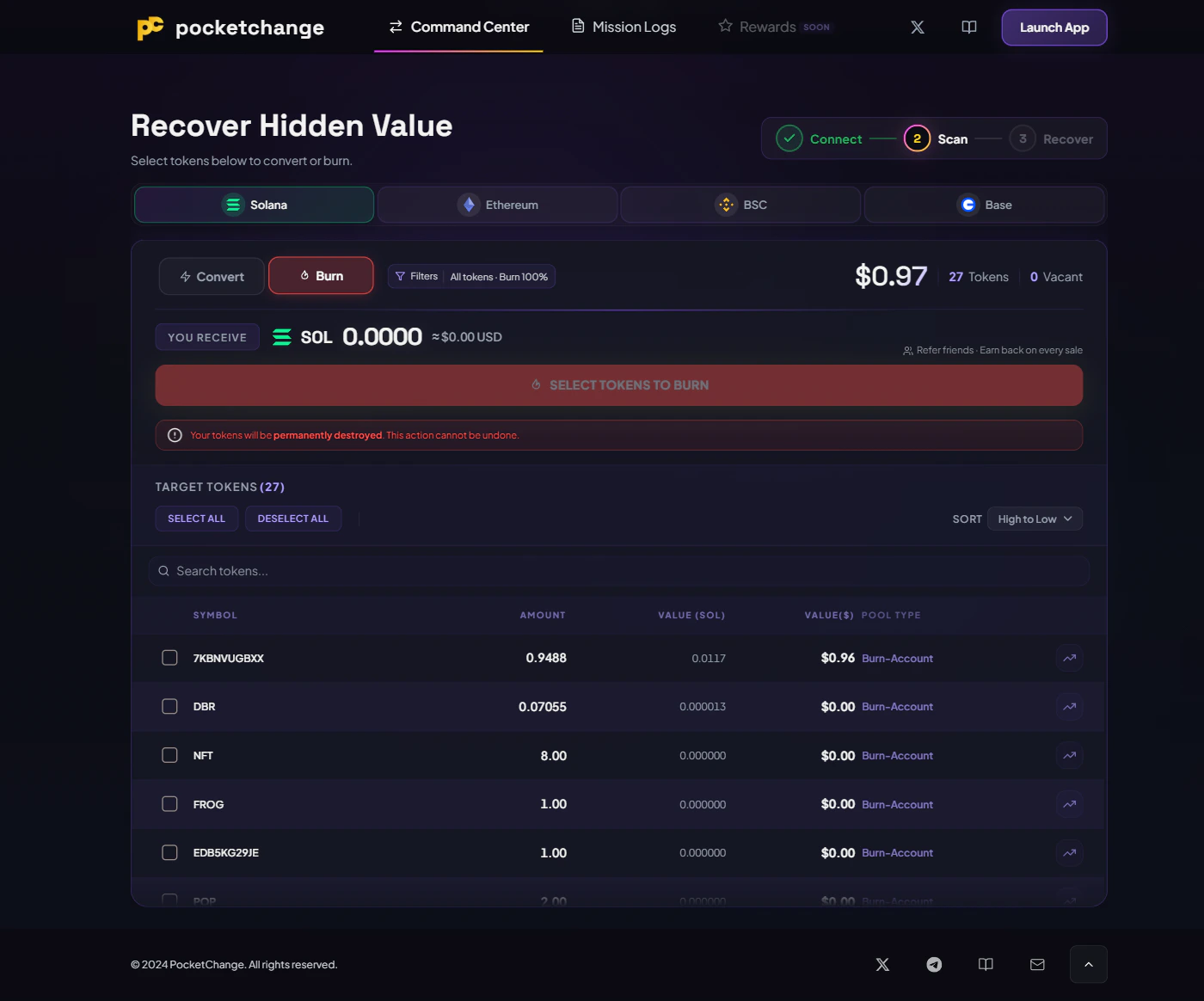
What changes in burn mode
| Detail | Convert | Burn |
|---|---|---|
| Available chains | All 4 | Solana only |
| What happens to tokens | Converted via DEX to native asset | Sent to burn address (destroyed) |
| Proceeds | SOL/ETH/BNB returned to wallet or destination | Nothing returned, tokens are gone |
| Sell percentage | Adjustable (25/50/75/100%) | Adjustable (25/50/75/100%) |
| Destination address | Your wallet or custom address | N/A, no destination toggle |
| Button text | ”Convert to SOL" | "Burn Tokens” |
| Execute button styling | Gold | Red |
Partial burns
You can burn a percentage of your token balance instead of the full amount. Use the sell percentage selector (25%, 50%, 75%, or 100%) to control how much of each selected token gets burned. The remaining balance stays in your wallet.Why burn
Burning is useful when a token has no liquidity to swap against. Instead of leaving dead tokens sitting in your wallet, burning removes them permanently. On Solana, burning also makes token accounts eligible for closure, which reclaims the ~0.002 SOL rent locked in each account. Some users burn tokens to reduce the visible supply of a project, which can be shared as proof on-chain.Burn warning
When burn mode is active, a warning is shown below the execute button:Your tokens will be permanently destroyed. This action cannot be undone.
After burning
The success overlay shows:- Title: “Burn Complete”
- Fire icon (instead of the checkmark used for conversions)
- “Burned” count and per-token status log
- Subtitle: “Tokens burned successfully. Ashes to ashes.”
Burned [SYMBOL] supply on Solana via @PocketChange_gg
Limitations
- Burn is Solana only. On EVM chains (Ethereum, BSC, Base), the toggle is locked to Convert.
- Token value is recorded even for burns so your Mission Logs reflect the USD value that was destroyed.
- If you switch to an EVM chain while in burn mode, the app automatically resets to Convert.
Using PocketChange
Full step-by-step walkthrough